

How do you share 60 desks among 100 employees and still make sure everyone has a place to work? Hot desking answers that question, and it has become a common setup in hybrid offices. With average office utilization at 53% in 2025, according to CBRE, organizations are looking for ways to match desks to actual demand.
This guide walks you through the full cycle of implementing hot desking in a hybrid office. You will learn how to design a policy, set booking rules, create check-in workflows, and measure results. By the end, you will have a clear path from planning to daily operations.
Key takeaways: The complete guide to hot desking in hybrid offices
- Hot desking replaces permanent desk assignments with shared, bookable workstations that reduce unused space in hybrid offices.
- A written hot desking policy should cover booking windows, check-in deadlines, clean desk rules, and documented exceptions.
- Zone management groups desks by work type, allowing quiet focus areas and collaborative neighborhoods on the same floor.
- A check-in step with automatic desk release frees desks booked by people who don’t show up.
- Occupancy analytics and regular employee feedback help you refine desk ratios, adjust zones, and improve the daily experience.
What is hot desking and how does it work?
Hot desking is a workspace arrangement where employees do not have permanently assigned desks. Instead, they reserve an available workstation for the day, a half-day, or a specific time block. Desks go back into the shared pool once the booking ends or the employee checks out.
The model gained traction after the shift to hybrid work, when many organizations realized that permanent desks sat empty multiple days per week. Rather than paying rent on unused square meters, teams began sharing a smaller number of workstations.
In practice, hot desking relies on three elements: a clear policy that sets expectations, a booking system that shows real-time availability, and a check-in process that confirms who actually shows up. When all three align, you get an office where space matches demand.
Hot desking vs. desk hoteling vs. assigned seating
| Model | How booking works | Booking window | Best for | Main risk |
|---|---|---|---|---|
| Hot desking | Employees pick any available desk on arrival or book a few hours ahead | Same day or short notice | Offices where attendance varies a lot from day to day | Ghost bookings and territorial behavior without clear rules |
| Desk hoteling | Employees reserve a specific desk in advance | Days or weeks ahead | Teams that need the same cluster of desks or specialized hardware | Phantom occupancy when the booking window is too long |
| Assigned seating | Each employee has a permanent desk | No booking needed | Roles with specialized equipment, regulatory separation, or a need for constant proximity | Desks sit empty on days people work remotely |
How does hot desking differ from desk hoteling?
Hot desking usually involves same-day or short-notice reservations. Employees pick any available desk when they arrive or book a few hours ahead. The system favors spontaneity and works well when attendance varies significantly from day to day.
Desk hoteling, on the other hand, involves longer reservation windows. Employees book specific desks days or weeks in advance. This suits teams that need the same cluster of desks repeatedly or require specialized hardware at their station.
When does assigned seating still make sense?
Assigned seating works for roles that need specialized equipment, regulatory separation, or consistent physical proximity. Some organizations run a mixed model: assigned desks for teams with fixed schedules and hot desks for everyone else.
A mixed model works better when assigned desks don’t sit empty on remote days. In Tidaro, for example, employees with a permanently assigned desk can share it with colleagues on days they don’t come in, so the desk goes back to the pool.
The key is matching the model to actual attendance data, not assumptions. If your occupancy analytics show that fewer than 60% of desks are used on any given day, hot desking or hoteling will likely save real estate costs.
Why implement hot desking in a hybrid office?
Hot desking brings measurable benefits when paired with a clear policy and the right tools. The gains go beyond cost savings and touch employee experience, collaboration, and data-driven decision-making.
How does hot desking reduce real estate costs?
When not everyone is in the office every day, maintaining a desk for each employee means paying for space that sits idle. CBRE’s 2026 Global Workplace & Occupancy Insights shows how this looks in practice. Average building utilization rose to 53% in 2025, the highest level since before the pandemic, and average peak utilization reached 80%. In other words, offices fill up on busy days, but on an average day close to half of the space goes unused.
That’s why one desk per person is no longer the default. In the same benchmark, no organization targets a 1:1 ratio anymore, and 48% aim for 1.01 to 1.49 people per desk, which works out to roughly 67 to 99 desks per 100 employees.By right-sizing the number of workstations, you can reduce your physical footprint or repurpose freed-up space for collaboration areas, quiet pods, or social zones.
How does hot desking support employee flexibility?
Employees who split their time between home and office value the ability to choose when they come in and where they sit. Hot desking removes the anxiety of arriving to find “your” desk occupied by someone else.
A booking system gives employees certainty. They know a workspace is waiting before they leave home, which makes the commute feel worthwhile.
What role does hot desking play in space optimization?
Booking data reveals which floors, zones, and desk types are in demand and which are consistently empty. That matters because utilization still trails targets: JLL’s 2025 Global Occupancy Planning Benchmark Report puts global office utilization at 54%, well below the 79% target most organizations set.
Over time, this data becomes the foundation for informed real estate decisions, from consolidating floors to redesigning layouts, which is what office space optimization comes down to. If you’re new to the topic, start with the occupancy metrics that matter most in a hybrid office.
How to design a hot desking policy
A written policy turns “grab any open desk” into a fair and enforceable system. Without one, hot desking tends to produce territorial behavior, ghost bookings, and underused floors. If you already have a hybrid work policy, hot desking rules can become one of its sections. Our hybrid work policy template is a good starting point.
What should a hot desking policy include?
Cover these eight areas in short, plain-language sections:
- Booking rules: How employees reserve a desk, how far in advance, and how many days they can hold at once.
- Check-in and no-shows: A deadline for confirming arrival, and what happens when someone does not show up.
- Clean desk expectations: A requirement to clear all personal items when leaving. Pair it with lockers or day storage.
- Fairness and priority: Whether anyone gets priority booking (e.g., accessibility needs) and why.
- Booking duration: Full day, half-day, or hourly slots, and rules around recurring reservations.
- Teams and neighborhoods: How team zones work and whether desks inside a zone are individually bookable.
- Shared equipment and cleaning: Who cleans desks and when (usually the cleaning team after hours), and how to report a problem with a monitor, docking station, or chair.
- Exceptions: Which roles keep fixed desks and why, documented openly so the system feels fair.
How do you make a hot desking policy fair?
Fairness comes from transparency. Open the booking window at the same time for everyone. Set limits on advance booking so one person cannot reserve the same desk for the entire month. Release no-show desks automatically after a grace period.
Priority exceptions, such as accessibility needs or equipment-dependent roles, should be documented in the policy itself. When exceptions are visible and justified, they build trust instead of resentment.
How to set booking rules that prevent chaos
Booking rules are the operational backbone of hot desking. They determine who can reserve, when, for how long, and what happens when plans change. Getting these right reduces daily confusion and keeps desk availability honest.
What booking window works for most hybrid offices?
A one- to two-week booking window strikes a balance between giving employees planning time and preventing desk hoarding. Shorter windows (same-day only) work for smaller offices where attendance is unpredictable. Longer windows risk creating phantom occupancy.
Some organizations also set a maximum number of consecutive days a single person can book, which prevents hot desks from quietly turning back into assigned seats.
How do you handle cancellations and no-shows?
Make canceling as easy as booking. One tap in the app should free the desk for someone else. For no-shows, set an automatic release timer. If an employee does not check in after a 15- to 30-minute grace period, the desk returns to the available pool.
Treat no-shows as a system issue first. Track patterns through your booking data, and have a conversation with frequent no-shows rather than jumping to penalties.
Should you allow recurring desk reservations?
Recurring bookings add convenience for employees who come in on the same days each week. The risk is that too many recurring reservations reduce available inventory for everyone else.
A common middle ground: allow recurring bookings for up to four weeks at a time, then require re-booking. This protects the shared pool while giving regular attendees predictability.
How to structure zones and office layout for hot desking
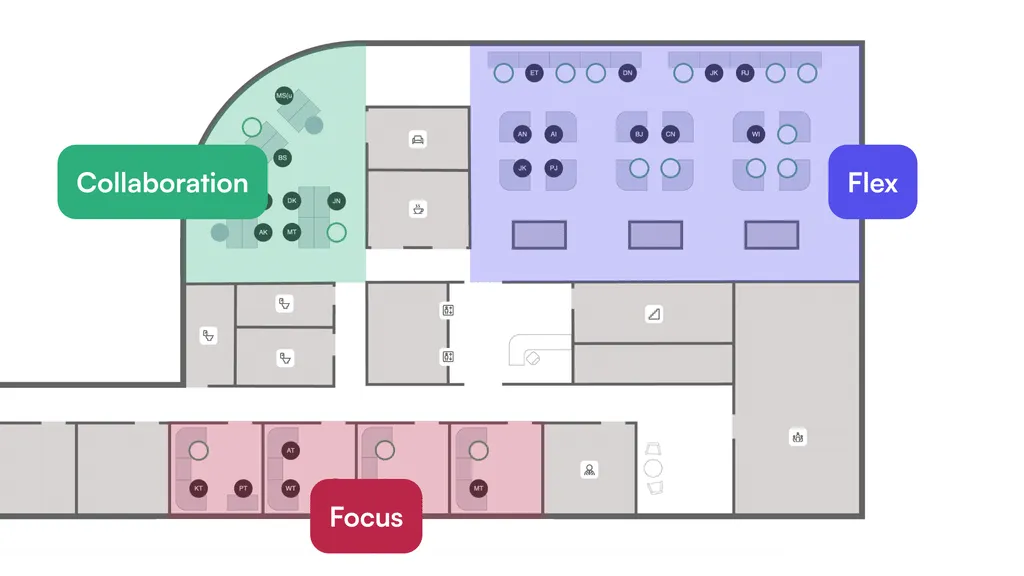
A hot desking layout is not just a floor of identical desks. Thoughtful zoning helps employees find the right environment for their task, reduces noise complaints, and keeps teams close when they need to collaborate.
What types of zones should you create?
Start with three primary zones:
- Focus zones: Quiet areas with individual desks, minimal foot traffic, and noise-dampening elements. Ideal for deep work.
- Collaboration zones: Clusters of desks near whiteboards, screens, or huddle rooms. Designed for project teams that need face-to-face interaction.
- Flex zones: General-purpose desks that can serve either function depending on the day.
Each zone should be clearly labeled on your booking system’s interactive map so employees know what to expect before they arrive.
How do team neighborhoods work in a hot desking setup?
Team neighborhoods assign a cluster of hot desks to a specific department or project group. Individual desks inside the neighborhood remain bookable, but the zone is reserved for that team during anchor days.
This approach balances flexibility with cohesion. Team members sit near each other on the days that matter most, while desks open up for the rest of the office on off-days.
How to calculate your desk-to-employee ratio
The desk ratio determines how many workstations you need relative to your headcount. Setting it too high wastes space. Setting it too low creates competition and frustration on busy days.
What data do you need to calculate the ratio?
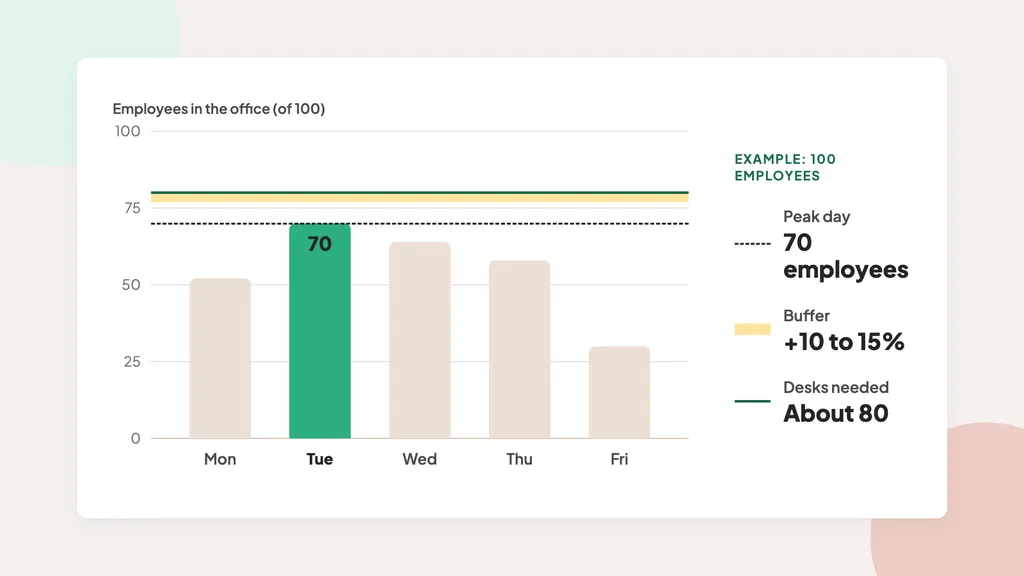
If you already have attendance data from badges, Wi-Fi, or an existing booking tool, use a few recent weeks of it. If you don’t, start with an estimate based on your hybrid policy and adjust it once the booking system shows real numbers. Either way, look at peak-day headcount (usually Tuesday, followed by Wednesday and Thursday, according to VergeSense’s occupancy data), average daily attendance, and the gap between the busiest and quietest days.
Add a 10 to 15% buffer to your peak-day number to account for spikes. If your peak day brings in 70 employees out of 100, a ratio of about 80 desks per 100 employees gives you enough capacity with room to absorb occasional surges.
How often should you revisit the ratio?
Review your desk ratio monthly for the first quarter after launch, then quarterly once patterns stabilize. Seasonal shifts, hiring waves, and policy changes all affect attendance.
Booking analytics from your workplace booking system make this review straightforward. Look at daily utilization rates, no-show percentages, and peak-day trends to decide whether you need more desks, fewer desks, or a different zone layout.
How to build check-in workflows that keep occupancy honest
A check-in workflow confirms that the person who booked a desk actually showed up. Without it, ghost bookings, desks that appear reserved in the system but sit empty in reality, erode the entire model.
What check-in methods work for hot desking?
The most common options are:
- QR code check-in: A printed code at each desk that employees scan with their mobile app on arrival. Fast, hardware-free, and difficult to spoof remotely.
- Mobile geofence: The app confirms the employee is inside the office building before allowing check-in. Works well for open floor plans.
- Manual confirmation: A simple “I’m here” button in the app, triggered by a push notification at the booking start time.
Tidaro supports two of these methods: employees check in by scanning a QR code or by tapping the check-in button in the app. If nobody checks in, automatic desk release returns the desk to the pool.
What happens when someone misses check-In?
Set a grace period (typically 15 to 30 minutes after the booking start time). If the employee has not checked in by then, the system automatically releases the desk. The employee receives a notification, and the desk becomes available for walk-in bookings or last-minute reservations.
Automatic desk release recovers capacity that would otherwise go to waste and keeps your utilization data accurate.
How to choose the right desk booking software
The right software turns your policy into an automated, enforceable system. Without it, running hot desking for more than a few dozen people quickly turns into a spreadsheet and an inbox full of desk requests. If you’re comparing options, our comparison of 20+ desk booking software solutions breaks down each tool’s main features, pricing, and limitations, so you can shortlist the ones that fit your setup.
What features should you look for in desk booking software?
Prioritize these capabilities when evaluating options:
- Interactive floor maps: Employees should see real-time availability on a visual map, not just a list of desk numbers.
- Configurable booking rules: Different zones may need different booking windows, durations, or approval flows.
- Check-in and automatic desk release: The system should enforce your no-show policy without manual intervention.
- Colleague finder and team invites: Employees should be able to see who is in the office and invite team members to sit nearby.
- Analytics and reporting: Utilization reports, no-show rates, and peak-day dashboards help you make data-driven decisions.
- Mobile app: Booking, canceling, and checking in from a phone is much more convenient than doing it at a computer, and it makes last-minute changes easy, for example when plans change on the way to the office.
- Single sign-on (SSO): Employees log in with the company account they already use, so there’s no extra password to remember. When someone leaves the company, IT disables one account and access to the booking system ends with it.
How does Tidaro handle hot desking for hybrid offices?
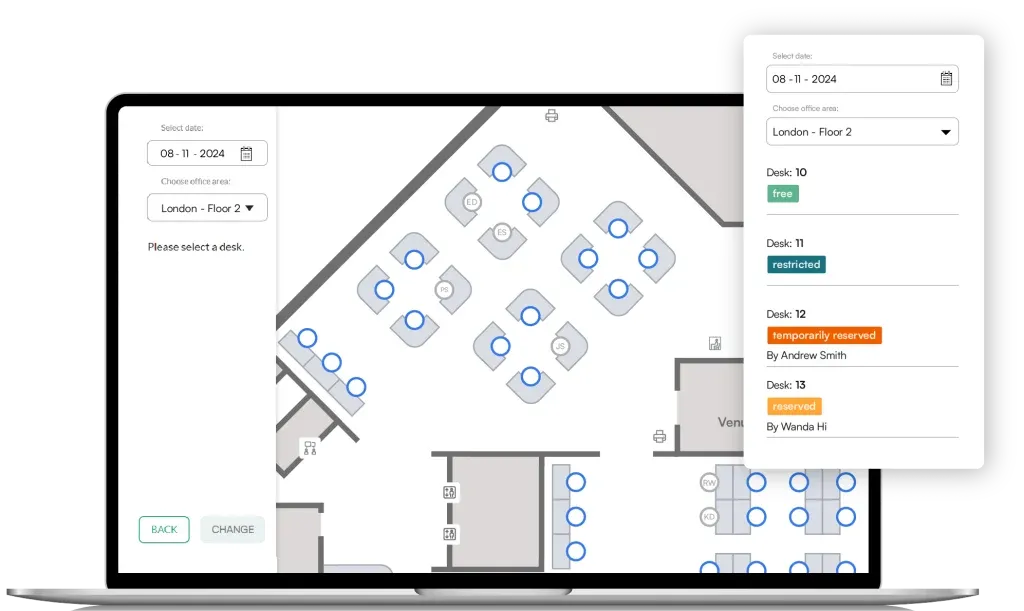
Tidaro is a desk booking system for hybrid offices that also covers room booking and parking spot reservations. Employees book a desk on an interactive office map in the mobile or web app and can see where their colleagues are working today, so it’s easier to sit together on anchor days.
For a mixed model, you can permanently assign desks to selected employees. When they work remotely, they can share their desk, so it goes back to the pool instead of sitting empty. Zones divide the office into areas, floors, and locations with different access levels, and desk parameters show equipment or ergonomic features, such as a monitor or an adjustable desk.
On the admin side, you manage desks and bookings directly on the same interactive map. You can see who is in the office on a given day, book desks for guests or on behalf of employees, cancel bookings, and block selected desks for specific groups. You decide how far ahead people can book, and in larger offices you can hand day-to-day management of a zone to its team leader, with no limit on the number of administrators. If someone keeps ignoring the rules, you can temporarily block their booking rights, although a conversation usually works better first.
Tidaro’s analytics cover space utilization and attendance, with CSV export, so you can check how the office is actually used and adjust the rules based on data.
How to roll out hot desking: a step-by-step process
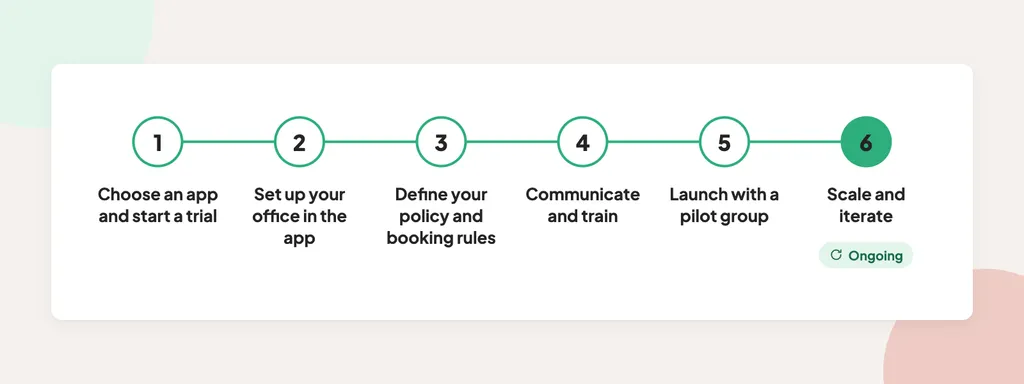
The plan below assumes you introduce a desk booking app at the very start. It’s the quickest way to get reliable occupancy data, and it saves you from tracking attendance by hand. A phased rollout reduces risk and gives you time to adjust before scaling to the full organization.
Step 1: Choose a desk booking app and start a trial
Pick a booking tool before you change any seating. Most desk booking apps offer a free trial, so you can test the setup in your own office before you commit. Tidaro, for example, offers a 14-day free trial.
Step 2: Set up your office in the app
Upload floor maps, define zones, and assign desk attributes such as equipment or accessibility features. To decide how many desks to make bookable at first, use what you already have: your hybrid policy (for example, three office days a week), badge or Wi-Fi data if your building collects it, and a quick check with team leads. If you use Tidaro, our team prepares the interactive maps for you, and setup typically takes 3 to 5 business days.
Step 3: Define your policy and booking rules
Write your hot desking policy using the eight-section framework described earlier in this guide. Decide on your booking window, check-in deadline, clean desk rules, and zone structure, then set them up in the app. Get input from team leads and facility staff before finalizing.
Step 4: Communicate and train
Send a clear announcement explaining why you are moving to hot desking, what the new policy says, and how to use the booking app. A short video walkthrough or live demo session helps employees feel confident. When leadership uses the system too, adoption improves.
Step 5: Launch with a pilot group
Start with one floor or one team. Monitor booking patterns, check-in rates, and employee feedback for two to four weeks. Use this data to refine your desk ratio, adjust zones, and fix any policy gaps before expanding.
Step 6: Scale and iterate
Roll out to the rest of the organization floor by floor. Continue reviewing occupancy data monthly. Adjust booking rules, zone layouts, and desk counts as patterns emerge. Hot desking is not a one-time project. It works when you treat it as an ongoing process.
How to handle common hot desking challenges
Even well-planned implementations face pushback and operational hiccups. Anticipating common issues helps you address them before they undermine the system.
How do you address employee resistance to hot desking?
Resistance usually stems from loss of personal space or uncertainty about finding a desk. Acknowledge these concerns openly and explain why the change is happening. Real estate savings are a valid reason, but on their own they sound like cost-cutting. A stronger argument is hybrid work itself: employees want the flexibility to work from home part of the week, and the company is ready to offer it. Keeping a dedicated desk for everyone who comes in two or three days a week doesn’t add up, so the office has to be organized differently. Framed this way, hot desking becomes part of the deal that makes flexible work possible. In our experience, this framing lands much better with employees than a cost-saving message.
Give employees control through features like recurring bookings, colleague finder, and equipment-based filtering. When people can plan their office day with confidence, resistance tends to fade.
How do you maintain team cohesion without assigned desks?
Team neighborhoods solve most cohesion concerns. Assign each team a home zone with enough hot desks for their typical in-office headcount. On anchor days, the zone is reserved for them. On other days, desks open to the wider office.
Pair this with a colleague finder feature so employees can see who from their team is coming in and coordinate their schedules.
How to measure hot desking success
Measuring results helps you prove the business case, identify areas for improvement, and communicate progress to leadership. Focus on a small set of metrics that directly reflect policy effectiveness.
What metrics should you track?
Start with these five:
- Daily desk utilization rate: The percentage of available desks actually occupied. It shows whether you have too many desks or too few.
- No-show rate: The percentage of bookings where the employee didn’t check in. A high rate means bookings block desks that nobody uses.
- Peak-day headcount: The highest number of in-office employees on any given day. This drives your desk ratio decisions.
- Employee satisfaction score: A short quarterly pulse survey on workspace availability, ease of booking, and overall experience.
- Cost per desk: Total real estate and facility cost divided by the number of active desks. Track this over time to quantify savings.
How do you use analytics to improve over time?
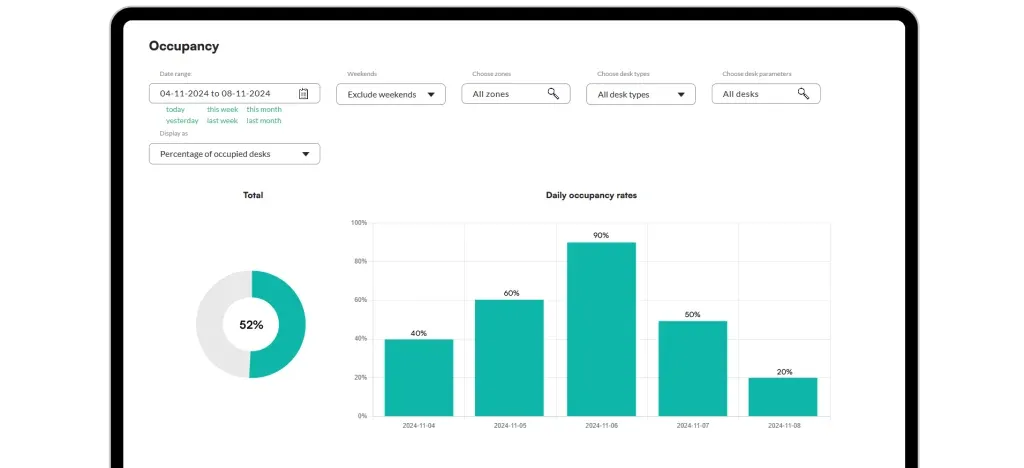
Review your booking data monthly. Look for patterns: which days consistently max out capacity, which zones are underbooked, and whether no-show rates are improving. Use these insights to adjust your desk ratio, reconfigure zones, or update booking rules.
In Tidaro, space utilization and attendance reports show these trends, and CSV export lets you add hot desking metrics to your broader facility management reporting.
In conclusion: How to make hot desking work for your hybrid office
Hot desking works when three elements come together: a clear policy, reliable booking software, and ongoing measurement. Start with a booking system that enforces rules automatically, a quick estimate of your desk needs, and a policy that covers the eight essentials.
Launch with a pilot group, gather feedback, and iterate. Track utilization, no-show rates, and employee satisfaction to make data-informed adjustments. The goal is not to squeeze more people into fewer desks. The goal is to give every employee a productive workspace on the days they come in, while making sure empty desks do not drain your budget.
If you’re ready to put this guide into practice, Tidaro has the features a hot desking setup needs, from booking on an interactive office map and check-in with automatic desk release to sharing assigned desks and occupancy reports. If you’d like to talk your setup through, book a 30-minute online demo and we’ll go through it together.
FAQs about hot desking in hybrid offices
What is hot desking and who is it for?
Hot desking is a shared workspace model where employees book available desks instead of having permanent assignments. It works for any organization with a hybrid schedule where not everyone is in the office every day, from mid-market companies with 50 employees to enterprise organizations with thousands.
How many desks do you need per employee in a hot desking setup?
It depends on your attendance. According to CBRE, the most common target is 1.01 to 1.49 people per desk, or roughly 67 to 99 desks per 100 employees. Start with your peak-day headcount, from existing data or an estimate based on your hybrid policy, and add a 10 to 15% buffer. Occupancy analytics help you track these numbers over time and refine the ratio.
What is the difference between hot desking and desk hoteling?
Hot desking involves same-day or short-notice reservations. Desk hoteling uses longer booking windows, often days or weeks ahead. Many organizations combine both models, applying hot desking to general areas and hoteling to team zones with specialized equipment.
How do you prevent ghost bookings in a hot desking system?
Require employees to check in when they arrive, either by scanning a QR code or confirming in the mobile app. If no check-in happens after a grace period, the system automatically releases the desk.
Do you need a clean desk policy for hot desking?
Yes. Hot desking only works if the next person finds an empty, ready-to-use workstation. Your policy should require employees to clear all personal items when they leave. Pair the rule with lockers or day storage so employees have a place for their things between office days.
How do you keep teams together in a hot desking office?
Use team neighborhoods. Assign each team a home zone with bookable desks. On anchor days, the zone is reserved for that team. A colleague finder helps employees coordinate their in-office days.
What should you do if employees resist hot desking?
Address concerns openly. Explain the business case and the employee benefits, like flexibility and modern booking tools. Start with a pilot group, gather feedback, and let early adopters share their experience. When employees see the system working, resistance typically decreases.
How long does it take to implement hot desking?
Most of the time goes into the policy and the pilot. Software setup can take just a few days, and you can run the pilot during a free trial before rolling out to the whole office.